
Wi-Fi 7 has been trickling down from flagship home routers into smaller form factors, and…
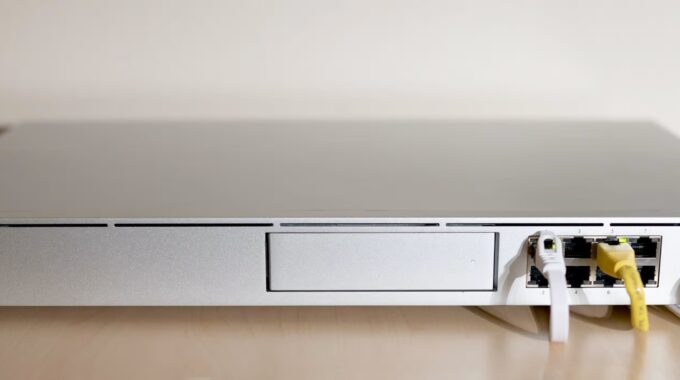
UniFi Dream Machine Pro Review – The Heart of a Scalable, Secure Network
When it comes to building a powerful home or small business network, Ubiquiti’s UniFi Dream Machine Pro (UDM Pro) continues to be a standout. It’s more than just a router—it’s a full-blown network controller, security gateway, and surveillance system core, all wrapped into one clean 1U rack-mounted unit.
If you’re someone who loves full control over your network with enterprise features minus the enterprise price tag, the UDM Pro might just be your ideal all-in-one solution.
🧠 Hardware & Core Features
The UDM Pro is designed to be the brain of your network. It’s equipped with a quad-core ARM Cortex-A57 processor, 4GB RAM, and 16GB of internal storage. Performance is snappy, even when juggling routing, firewall duties, VLANs, VPNs, and camera streams via UniFi Protect.
Key hardware features:
- 8x Gigabit RJ45 switch ports (non-PoE)
- 1x 10G SFP+ WAN port
- 1x 10G SFP+ LAN port
- 1x Gigabit RJ45 WAN port
- 1x 3.5” HDD bay (for UniFi Protect video storage)
- Built-in UniFi OS, allowing modular apps:
- UniFi Network
- UniFi Protect
- UniFi Access
- UniFi Talk
You don’t need a separate Cloud Key or UniFi Controller running elsewhere—this is the controller.
🌐 Network Performance
The UDM Pro can easily handle gigabit internet and supports intrusion detection/prevention (IDS/IPS) and deep packet inspection (DPI) without a huge performance hit.
Routing performance with IDS/IPS enabled is roughly 850 Mbps to 1 Gbps, depending on settings. With IDS/IPS disabled, it can push up to 3.5 Gbps+. It’s rock solid for everything from general web traffic to remote work VPNs and site-to-site tunnels.
🔐 Security & Control
UniFi’s firewall tools give you precise control over traffic with:
- VLAN segmentation
- Geo-blocking
- DPI insights
- L2TP & custom VPN options (WireGuard possible via CLI)
- Custom routing rules
- Device-level statistics and historical usage
All manageable via an elegant web UI or mobile app. UniFi’s interface is one of the best in the business, striking a balance between usability and control.
🛠️ Integration & Expandability
The UDM Pro really shines when paired with other UniFi gear:
- Add UniFi access points for scalable Wi-Fi coverage
- Deploy UniFi Protect cameras for surveillance
- Use UniFi switches (including PoE models) to build out your LAN
Because the controller is built-in, setup is fast and remote management is a breeze via the UniFi cloud or self-hosted solutions.
🟢 Pros
✅ All-in-one router, firewall, NVR, and controller
✅ Beautiful and responsive UI
✅ High throughput with threat protection
✅ Scales beautifully with UniFi APs and switches
✅ 10G SFP+ support for WAN and LAN
✅ Frequent firmware updates and strong community support
🔴 Cons
❌ No built-in Wi-Fi (APs sold separately)
❌ No PoE ports (you’ll need a UniFi PoE switch)
❌ Some advanced features need CLI tweaks
❌ May be overkill for simple home networks
👥 Who Is This For?
The UDM Pro is built for tech-savvy home users, homelab builders, and small to medium businesses who want:
- Deep visibility and control
- Scalable hardware
- Security and network segmentation
- Clean UI for managing multiple UniFi services
If you’re already in the UniFi ecosystem—or plan to be—the UDM Pro makes an outstanding centerpiece.
⭐ Verdict: 9/10
The UniFi Dream Machine Pro isn’t just a router—it’s an ecosystem gateway. It’s powerful, polished, and scales effortlessly with your network. If you’re serious about control, performance, and future-proofing, this is one of the best investments you can make.
💬 Need help setting yours up or choosing the right AP?
Follow me on Facebook: facebook.com/KFInternetFixer

Related Posts
Comments (0)