
Wi-Fi 7 has been trickling down from flagship home routers into smaller form factors, and…
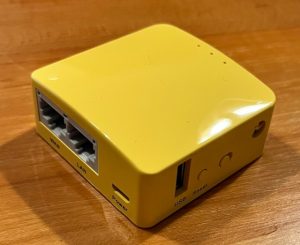
GL.iNet GL-MT300N-V2 (Mango) Review: The Pocket Router That Actually Earns Its Keep
You know that feeling. You’re in a hotel room wrestling with a login page that refuses to accept more than one device. Or your smart TV keeps buffering because the router is two rooms away.
The GL.iNet Mango solves exactly those kinds of problems—simple, frustrating situations that most of us run into sooner or later.
It isn’t designed for the road warrior who needs a feature-packed travel router capable of handling every scenario. Instead, it’s aimed at the occasional traveller, someone staying in hotels a few times a year, or even someone looking for an inexpensive way to fix a stubborn Wi-Fi dead zone at home.
Let’s be upfront, though. The Mango is one of the older devices in GL.iNet’s lineup. Its specifications certainly show its age. That doesn’t make it a bad router—it simply means it’s important to understand who it’s still the right choice for.
Specs and Hardware Overview
| Specification | Details |
|---|---|
| Model | GL-MT300N-V2 (Mango) |
| CPU | MediaTek MT7628NN @ 580MHz |
| RAM | 128MB |
| Flash Storage | 16MB |
| Wi-Fi Standard | 802.11b/g/n, single-band 2.4GHz only |
| Max Wi-Fi Speed | 300Mbps |
| Ethernet Ports | 2× (1 WAN, 1 LAN), 100Mbps |
| USB Port | 1× USB 2.0 |
| VPN Throughput | OpenVPN up to ~11Mbps, WireGuard up to ~45Mbps |
| Power Input | 5V/2A (Micro USB) |
| Dimensions / Weight | 58 × 58 × 25mm / 40g |
The Mango doesn’t pretend to be a performance powerhouse. It runs exclusively on the 2.4GHz band, with no 5GHz radio, and both Ethernet ports are limited to 100Mbps rather than Gigabit speeds.
Those compromises are part of what allows it to remain so compact, lightweight and affordable. For the tasks it was designed to perform, they generally aren’t a major issue.
The biggest limitation is undoubtedly the lack of 5GHz Wi-Fi. In busy environments—such as apartment complexes, airports or hotels where dozens of networks compete for the same 2.4GHz channels—you’ll notice reduced throughput and potentially less reliable performance compared to a dual-band travel router.
VPN performance is respectable for a router of this class. WireGuard delivers speeds of around 45Mbps, which is more than enough for web browsing, email, video calls and most HD streaming. In practice, however, the 2.4GHz wireless connection is usually the limiting factor long before the VPN itself becomes the bottleneck, particularly when transferring large files or attempting to stream 4K content.
🔐 Privacy & Security
The Mango’s biggest strength isn’t its hardware—it’s what it can do with a VPN.
Rather than connecting your devices directly to an unfamiliar network, such as a hotel, Airbnb or café, you connect them to the Mango. The Mango then securely tunnels all of your internet traffic through a VPN, meaning your devices never communicate directly with the local network.
To use this feature, you’ll need a WireGuard server to connect back to. Many modern routers include a built-in WireGuard server, but if yours doesn’t, it’s easy to set one up using a Raspberry Pi, mini PC, or an old computer running Debian or Ubuntu. Alternatively, you can connect the Mango to a commercial VPN provider if you don’t have a home VPN server.
The real advantage is that you only need to configure the VPN once on the Mango. Every phone, tablet, laptop or streaming device that connects to it automatically benefits from the same secure connection—no need to install or configure VPN software on each individual device.
For occasional travellers, that’s a huge convenience. You simply connect to the Mango as you normally would, and your traffic is automatically protected every time.
In practical terms, this means:
- Your internet traffic appears to originate from your home network (or your chosen VPN provider), rather than the hotel or public Wi-Fi you’re using.
- Your devices are isolated from other users on the local network, reducing the risk of snooping or attacks from compromised devices.
- Every connected device is automatically protected without needing its own VPN app or configuration.
- You can securely access services on your home network while you’re away, just as if you were sitting at home.
Another welcome inclusion is the built-in AdGuard Home integration. Once enabled, it can block many online advertisements, trackers and malicious domains across every connected device without installing additional software.
It’s worth noting, however, that AdGuard Home can’t block advertisements that are embedded directly into video streams, such as those served within YouTube or Facebook videos. Those ads are delivered as part of the video itself, making them much harder to filter.
Ultimately, the Mango prioritises convenience and privacy over raw performance. For its target audience, that’s exactly the right compromise.
⚙️ Real-World Use: The Repeater Case
This is where the Mango earns its place in day-to-day use.
Instead of every device struggling to maintain a weak connection to the main router, the Mango can be placed closer to the edge of your existing Wi-Fi coverage. It connects to your home’s Wi-Fi and rebroadcasts it as its own network, allowing nearby devices to connect to the stronger signal from the Mango rather than trying to reach the main router directly.
One of the biggest advantages is convenience. Once you’ve configured the Mango with your own Wi-Fi network and devices have connected to it, they’ll remember that network. Whether it’s my iPhone, laptop, Fire TV Stick, my wife’s phone or my son’s tablet, they reconnect automatically whenever the Mango is powered on. There’s no need to reconnect every family member’s device each time you’re away—everything simply works.
Setup only takes a few minutes using either the GL.iNet web interface, so you don’t need any real networking experience to get started.
Its compact size is another highlight. The Mango is genuinely pocket-sized and draws so little power that it can often be powered directly from a USB port on a TV, monitor or even a power bank. During my own travels, I’ve found that most hotel televisions provide enough USB power to run it, eliminating the need to carry another wall charger.
One thing to keep in mind is that repeater mode comes with a trade-off. Because the Mango uses the same 2.4GHz radio to both receive and retransmit data, the available wireless bandwidth is shared. In ideal conditions, this can effectively halve your throughput. For web browsing, emails, video calls and HD streaming, this is rarely noticeable, but it can become a limitation when transferring large files or streaming high-bitrate 4K content.
🟢 Pros
✅ Incredibly compact and lightweight, with low power consumption—runs happily from a power bank or most TV USB ports.
✅ Lets multiple devices share a single hotel or public Wi-Fi login, eliminating the hassle of captive portals on every device.
✅ Supports routing all connected devices through a home or commercial VPN, improving privacy without configuring each device individually.
✅ Simple setup through the GL.iNet app or web interface—ideal for users with little networking experience.
✅ Excellent value for money considering the convenience and security it provides.
🔴 Cons
❌ 2.4GHz Wi-Fi only—no 5GHz support, limiting performance and making it more susceptible to congestion in busy environments.
❌ Both Ethernet ports are limited to 100Mbps rather than Gigabit speeds.
❌ Not designed for heavy workloads or high-speed multi-device usage—this is a convenience and security device, not a performance router.
❌ Frequent travellers or power users will likely outgrow it, with newer GL.iNet models offering significantly faster hardware and features.
🧑💻 Who Is This For?
The Mango is perfect for occasional travellers who want a simple, affordable way to create their own trusted network while away from home.
I’ve also lent this device to family and friends who have needed a temporary repeater while staying elsewhere, extending Wi-Fi around their property, or even using it as their main router while waiting for a replacement. At this price point, it’s an inexpensive way to experiment with networking features such as repeater mode, VPN routing and guest networks without committing to a more expensive device.
It’s equally at home extending Wi-Fi into a dead zone—a garage, granny flat or the far end of the house—or creating a private network in a hotel or Airbnb where all of your devices reconnect automatically and can securely route their traffic back through your home VPN.
If you’re simply looking for an inexpensive introduction to travel routers without spending flagship money, the Mango is an excellent place to start.
However, if you travel frequently, need dual-band Wi-Fi, faster VPN performance, USB modem support or higher throughput, you’ll be much better served by something like the Beryl AX. The Mango is intentionally modest—and that’s exactly the point.
⭐ Verdict: 4/5
The GL.iNet Mango isn’t trying to be the fastest or the most feature-rich travel router on the market, and it never was.
What it does offer is a reliable, inexpensive solution to problems many people regularly encounter—sharing a single hotel login across multiple devices, creating a trusted private network on public Wi-Fi, or extending wireless coverage into those frustrating dead spots at home.
Its ageing hardware and 2.4GHz-only wireless are genuine limitations, but they’re easy to forgive when viewed in the context of its intended purpose and price.
If your needs align with what the Mango was designed to do, it’s still an easy recommendation. If they don’t, GL.iNet’s newer range offers plenty of excellent alternatives.
👀 Worth Noting: Mango 2 Is on the Way
If you’re reading this before buying, it may be worth keeping an eye on what’s next.
GL.iNet has already announced the Mango 2 (GL-MG1300) as the successor to the original Mango. While full specifications and release details haven’t yet been published, it will be a dual-band travel router designed to address one of the biggest limitations of the current model—its reliance on 2.4GHz Wi-Fi.
If the original Mango already meets your needs, it’s still a great little router. But if you’re not in a hurry, waiting to see what the Mango 2 brings could be worthwhile. You can subscribe for updates directly on GL.iNet’s product page: Mango 2 — GL.iNet
🙌 Support This Review
If this review helped and you’re picking up a GL.iNet router, using the links below costs you nothing extra and helps support this site:
💬 Have questions or want help setting yours up?
Follow me on Facebook: facebook.com/KFInternetFixer

Related Posts
Comments (0)